

A service desk shouldn’t need a person to move every routine request forward. Automation in the service desk uses rules, self-service portals, knowledge bases and AI to handle common tasks such as ticket routing, status updates and basic troubleshooting. It can also guide employees through support steps while routing complex or unusual issues to a support team.
It’s understandable to want faster, more consistent support without making it harder for employees to get help. The key is to automate the right work, with clear processes and human support where judgement is needed. This article explains how portals and knowledge bases can deflect routine tickets, where AI can assist, and what to consider when connecting automation to existing systems. You’ll get a practical view of how these elements work together to make service desk operations more manageable.
Key Takeaways
- Identify repeatable workflows, from approvals to employee offboarding, that can be automated with clear ownership and monitoring.
- Make support guidance easy to find so employees can resolve routine issues through a portal or knowledge base.
- Use AI for common queries and guided troubleshooting, while keeping a clear route to human support for complex issues.
- Explore how ZANGAARD’s Managed IT Operations can help bring service desk processes and ongoing oversight together.
1. What is service desk automation?
Service desk automation uses software rules to move support requests through defined workflows. For example, a request for application access can trigger approval, assignment and fulfilment steps. Automation in a service desk can also schedule maintenance, synchronise data and update records. These workflows reduce repetitive handling and help teams manage operational delivery.
Start by mapping one frequent process, such as onboarding. Define who approves access, which accounts need setting up and what confirms completion. For offboarding, a workflow can deactivate work and user accounts, notify IT and other departments, and forward emails to a manager or relevant department. Automating these steps helps organisations follow a consistent process and monitor service-level agreement commitments.
Rule-based workflow engines apply conditions to incoming requests. A rule might assign a password-reset ticket to the relevant team, then send status updates as it progresses. To implement automation in existing workflows, document each hand-off, identify exceptions and test the rules before expanding them. Integrating with legacy IT can add complexity, so map system dependencies early. A structured service operations approach can connect workflow design with daily delivery.
For smaller organisations, the best starting point is usually rules and forms within their existing ticketing platform. Larger organisations may need stronger integration, approval controls and reporting across teams. Compare platforms by workflow flexibility, integrations, knowledge tools, reporting and access controls; pricing models and included features differ. In Denmark, software costs depend on users, modules, integrations and support, with a quote request establishing the price.
Track ticket volume, time to resolution, first-contact resolution, SLA compliance, reopened requests and employee satisfaction. Review these measures together to spot faster handling that may be creating repeat tickets. Security and privacy risks include excessive access, exposed personal data and weak audit trails. Limit permissions, define data handling and retention, and review workflow logs before scaling automation.
2. Self-service portals and knowledge-base ticket deflection
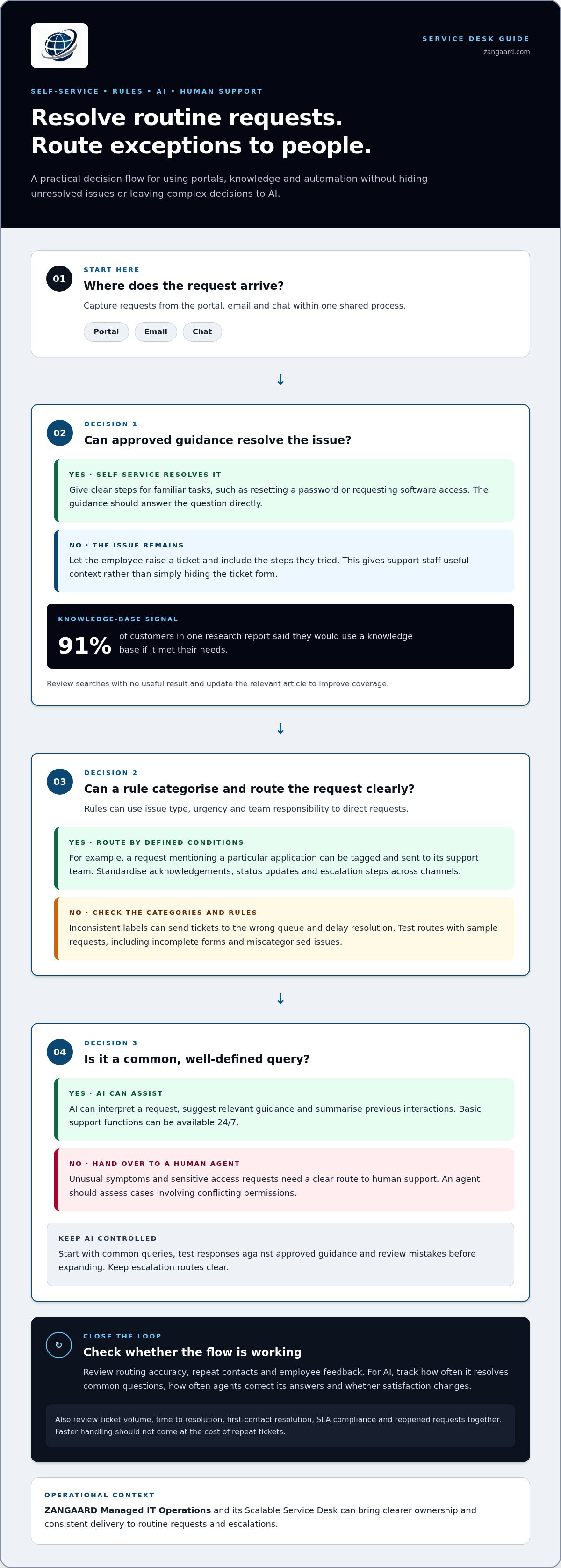
A self-service portal gives employees one place to report issues, find guidance and check request progress. Organise content around familiar tasks, such as resetting a password or requesting software access. A useful knowledge base answers the question directly, then gives clear steps and a route to report failure. One research report found that 91% of customers would use a knowledge base if it met their needs. Review searches with no useful result and update the relevant article to improve coverage.
Deflection works when guidance resolves the issue, not when it merely hides the ticket form. For a password problem, a portal article might guide the employee through approved reset steps. If those steps fail, the portal should let them raise a ticket and include the actions they tried. This gives support staff useful context and helps distinguish unresolved issues from completed self-service.
Automation tools can categorise tickets using predefined rules. For example, a request mentioning a particular application can be tagged and routed to its support team. Assignment rules can also consider issue type, urgency and team responsibility. Keep categories clear: inconsistent labels can send tickets to the wrong queue and delay resolution.
Capture requests from the portal, email and chat within a shared process. Ticket process automation can standardise acknowledgements, status updates and escalation steps across these channels. During implementation, test each route with sample requests, including incomplete forms and miscategorised issues. Then review routing accuracy, repeat contacts and employee feedback. Greater portal use should make support easier to access, while consistent hand-offs help teams manage incoming ticket volume.
3. AI-driven service desk automation
AI can help service desk agents interpret an employee’s request, suggest relevant guidance and summarise previous interactions. A virtual assistant can handle common questions, whilst unusual symptoms or sensitive access requests should move to a human agent. This division can streamline service delivery without leaving complex decisions to automated responses. Basic support functions can also be available 24/7, although AI still needs clear escalation routes.
Apply AI within an established service management process rather than treating it as a separate channel. Start with a defined set of common queries, test responses against approved guidance, and review mistakes before expanding. For example, an assistant might explain a standard access process, but an agent should assess a request involving conflicting permissions. A controlled rollout can reduce avoidable intervention while preserving accountability when context matters.
Measure performance against both efficiency and employee experience. Track how often AI resolves common questions, how frequently agents need to correct its answers, and whether satisfaction changes. The European Union identifies customer satisfaction and AI handling of common questions as outcomes organisations can track. Review results regularly, then adjust the guidance, escalation rules or use cases if quality declines.
Adoption is moving towards closer collaboration: Gartner projected that by 2027, IT service desk analysts would interact with AI as frequently as they do with business users. Forrester reported that more than half of successful GenAI initiatives in 2025 focused on employee support, particularly operational-process automation. The practical takeaway is to prioritise well-defined support tasks, integrate AI into existing processes and keep human oversight for exceptions.
ZANGAARD: Managed IT Operations
ZANGAARD helps organisations coordinate service desk workflows, operational oversight and IT infrastructure management. Its Managed IT Operations and Scalable Service Desk can bring clearer ownership and consistent delivery to routine requests, escalations and ongoing service improvement.
For automation initiatives, the practical value lies in aligning workflow design with daily support: defining which requests can follow established processes, where human intervention is needed and how performance is reviewed. ZANGAARD’s managed dual-shoring approach combines Danish management and local oversight with offshore operational capacity in the Philippines. Explore its IT service offerings to see how the service portfolio can support your operational requirements.
Contact ZANGAARD to discuss your service desk operations, or visit zangaard.com.
Turn automation into a controlled next step
Choose a workflow where automation can improve consistency without obscuring ownership. Map the current process, identify where requests stall, and agree how exceptions reach an agent. This gives teams a clear basis for improving automation in a service desk before extending it to more workflows.
ZANGAARD’s Managed IT Operations, IT Infrastructure Management and Scalable Service Desk help organisations align service processes with operational delivery. Start with the workflow causing the greatest friction for employees and support teams, rather than choosing the one with the most impressive technology.
With a measured starting point and clear accountability, service desk improvements can develop into a more manageable way of working.
Frequently Asked Questions
What is service desk automation?
Service desk automation uses configured rules and software to progress support work with less manual handling. For example, a new access request can be checked for required details, sent for approval and recorded. Clear ownership matters: teams must define who handles exceptions and how employees are updated when a request needs further review.
What tasks can't be automated?
Tasks requiring judgement, sensitive communication or investigation should retain human oversight. A report that simply says “the system is down” may need an agent to clarify which service is affected, who is impacted and what changed. Automation can gather initial details, but an experienced person should assess ambiguous incidents and decide how to respond.
Which service desk tasks can be automated?
Alongside routine request handling, teams can automate reminders for overdue approvals, scheduled reports and follow-up surveys after a ticket closes. For example, an approval workflow can notify the responsible manager when a request is waiting, then record the decision. Map each task’s owner and completion criteria first, so automated actions have a clear endpoint.
What are the benefits and drawbacks of service desk automation?
Automation can make repeatable processes more consistent and free agents to investigate complex issues. The trade-off is that a flawed rule can repeat the same mistake across many requests. If a category is too broad, different issues may reach the same team. Review exceptions and user feedback, then refine the process before expanding it.
How can AI and chatbots automate service desk support?
AI and chatbots can interpret an employee’s wording, suggest a relevant help article and collect details before handing the request to an agent. For example, a chatbot could ask which device is affected and whether an error message appears. Give users a clear way to reach an agent when guidance fails, and review unresolved conversations to improve future answers.

Disclaimer
The purpose of this article is to generate inspiration, reflection and to start a debate across markets, industries and organizations. We do not recommend any actions soly based on the article statements, claims or opinions, but recommend you to reach out directly to ZANGAARD for a qualified review, dialogue and/or consultation. Reach out at [email protected] or visit our website www.zangaard.com


