

A work laptop can become a weak link when corporate files and personal apps share the same space. Remote work can increase the risk of a data breach through unsecured connections, phishing and lost devices. Ensuring data security with a remote IT team means controlling access and keeping work data separate. Multi-factor authentication adds an extra check before access is granted.
It is understandable to focus on the network, but the boundary between work and personal tools deserves equal attention. This article explains how multi-factor authentication helps protect sign-ins and how separating corporate data from personal applications can reduce exposure. It also covers practical ways to set access rules and manage work devices, helping people work remotely without unnecessarily exposing sensitive information.
Key Takeaways
- Reduce remote-work exposure by reviewing who can access sensitive systems and information, and remove permissions that are no longer needed.
- Use multi-factor authentication to add a further identity check when team members sign in to company systems.
- Keep work data separate from personal apps and use company-approved devices and networks to limit accidental exposure.
- Build security into day-to-day IT operations through consistent access controls, device oversight and clear processes for handling data.
1. Why is remote work data protection so important?
Remote access creates more routes into company systems: home networks, mobile devices and cloud applications can all introduce vulnerabilities. Phishing can steal credentials, while an unsecured connection may expose sensitive information in transit. A VPN encrypts traffic between a remote user and company systems; SASE can combine secure network access with security controls. Zero-trust access adds another safeguard by verifying the user and device before granting access, rather than trusting a connection simply because it reaches the internal network.
For safer access, approve specific tools, require authentication for each user and device, and grant only role-based permissions. Review access regularly and remove accounts or permissions that are no longer needed. Encrypt sensitive data in transit and when stored; according to the National Institute of Standards and Technology, AES encryption for stored data uses key lengths of 128, 192, or 256 bits. The GDPR applies when remote employees access or process EU residents’ personal data. Document data-handling rules, acceptable use and security responsibilities as part of the organisation’s access policy.
The cost of cybersecurity tools in Denmark depends on the tools selected, the number of users and devices, and the administration required. Good practice combines controlled access, encryption, approved tools and regular permission reviews. Secure remote devices with encryption, endpoint protection and prompt software updates. Maintain backups that can be restored if ransomware disrupts access, and test recovery procedures so the team knows how to restore systems and files.
Monitor access logs and security events across systems, but limit monitoring to defined purposes and handle records carefully. Explain monitoring practices in internal policies and involve appropriate HR and legal colleagues. After a suspected breach, restrict affected access, preserve relevant logs, contain the incident, restore systems from clean backups and communicate through an agreed response process. Record the actions taken and assess whether personal data was affected.
2. Multi-factor authentication
A password alone gives attackers one barrier to overcome. Requiring an additional identity check is a practical control for ensuring data security with a remote IT team. Multi-factor authentication (MFA) asks employees to prove their identity using another factor, such as an authenticator app or security key. Two-factor authentication (2FA) is a type of MFA that uses two distinct factors, for example a password and a device the employee possesses.
Set a security policy requiring MFA for accounts that access company email, file storage and remote access tools. Before workers join, specify approved authentication methods and explain how to report a lost device. Keep account recovery controlled: verify identity before resetting access, then revoke the old method if a device is lost or replaced.
Password policies still matter. Require unique credentials for work accounts and set a minimum length of seven characters. A password manager can help employees create and store different passwords instead of reusing them across services. MFA and strong passwords work together: a password protects the initial sign-in, while MFA adds a separate identity check.
Before rolling out a new sign-in process across the organisation, test it with a group of employees. Give workers clear guidance on approving expected prompts, recognising suspicious requests and reporting unusual activity. Review access when roles change or accounts close, and include administrator accounts in the policy. Consistent use of these measures supports the broader work of ensuring data security with a remote IT team.
3. Isolation of corporate data from personal applications
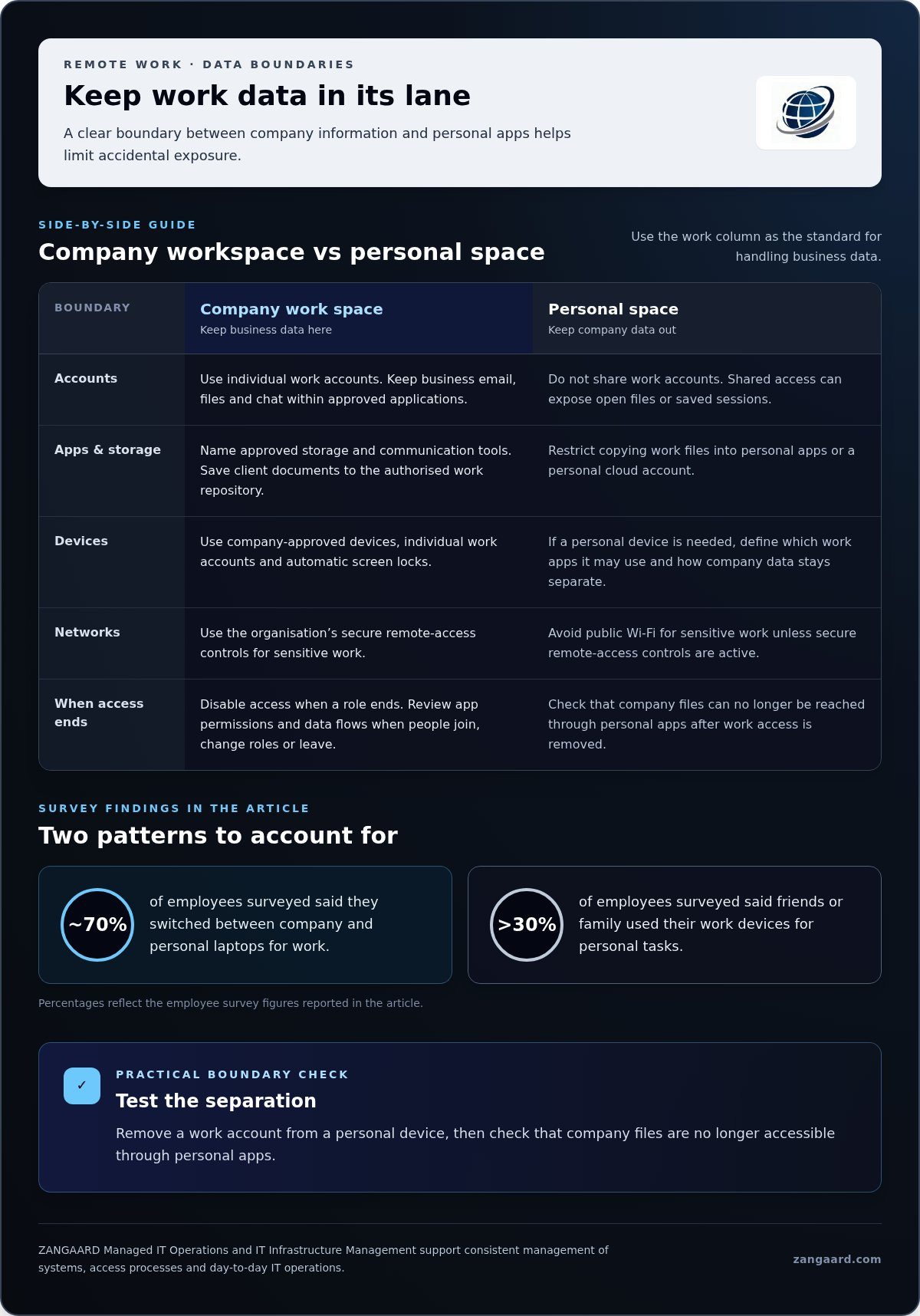
Separating work data from personal apps limits where sensitive data can travel. Nearly 70% of employees surveyed said they switched between company and personal laptops for work. Separate work and personal accounts, and keep business email, files and chat inside approved applications. A managed work profile or container can keep corporate files apart from personal photos, messages and downloads, reducing accidental sharing.
Set clear rules for company data: name approved storage and communication tools, restrict copying into personal apps, and disable access when a role ends. For example, an employee should save a client document to the authorised work repository, not a personal cloud account. These boundaries help protect information if a personal app is compromised, an account is shared or phishing captures a password.
More than 30% of employees surveyed said they let friends or family use work devices for personal tasks. Shared access can expose open files or saved sessions to unauthorised access. Require individual work accounts, automatic screen locks and company-approved devices. Avoid public Wi-Fi for sensitive work unless the organisation’s secure remote-access controls are active. Personal devices and public networks can lack consistent protections, increasing exposure to attacks and making a cybersecurity incident harder to contain.
Review app permissions and data flows when workers join, change roles or leave. If someone needs a personal device, define which work applications they may use and how corporate data stays separate. Test the process by removing a work account and checking that company files are no longer accessible through personal apps. Clear separation makes it easier to identify affected systems and respond methodically after an incident.
ZANGAARD: Managed IT Operations
ZANGAARD helps organisations bring remote IT support and operational oversight into a more controlled structure. Its Managed IT Operations and IT Infrastructure Management support businesses seeking consistent management of systems, access processes and day-to-day IT operations.
These services can help when remote workers use different devices, applications or access routines, making security responsibilities harder to coordinate. A Scalable Service Desk gives employees a clear route for IT requests, while Outsourcing Services can provide additional operational capacity. The right approach depends on the systems in use, the team’s responsibilities and the organisation’s existing processes.
If you are reviewing how your remote IT operations are managed, contact ZANGAARD to discuss your requirements.
Make security part of everyday operations
Make security part of how remote work is governed, rather than treating it as a separate technical task. Assign clear ownership for access decisions, device standards and incident follow-up, then revisit those controls as roles and systems change. This turns ensuring data security with a remote IT team into a durable operating practice.
ZANGAARD offers Managed IT Operations, IT Infrastructure Management and a Scalable Service Desk to help organisations coordinate the systems and support processes behind remote work. These services are relevant when security controls need to work consistently across employees, infrastructure and everyday IT requests.
A measured, well-governed approach gives your team a clearer framework for working remotely. Contact ZANGAARD to discuss how its services could support your organisation’s IT operations.
Frequently Asked Questions
Do remote workers increase the chance of a data breach?
Remote work can increase exposure when staff connect from varied locations and devices, but the risk depends on how access is controlled. Breaches also take longer to discover at companies where remote work is common: 58 days longer. A practical response is to define how workers report suspicious activity and ensure security teams can review access records across remote systems.
Why is remote work data protection so important?
Protecting personal information also helps preserve customer trust when employees work outside the office. Remote work does not remove the need to handle personal information appropriately, especially when employees access it from different locations. Make responsibilities clear, especially when staff access data across different systems or locations.
How should remote IT teams manage access controls and multi-factor authentication?
Assign access according to each person’s role, then review it whenever responsibilities change. For example, an employee moving into a different support function may no longer need access to the same systems or records. Require multi-factor authentication for accounts that provide access to business systems, including administrator accounts, and promptly disable access when someone leaves or no longer needs it.
What encryption standards should remote teams use for data at rest and in transit?
Use encryption for stored data and for information travelling between devices and services. The National Institute of Standards and Technology identifies AES key lengths of 128, 192, or 256 bits for stored data. For web traffic, TLS encrypts the connection between a user’s device and a server. Apply these controls to relevant endpoints, servers and backups, and manage access to encryption keys.
What security policies and training should remote IT employees follow?
Give employees written guidance on acceptable use, data storage, approved communication tools and reporting suspected incidents. Start training when workers join and continue with updates on phishing and social engineering. Practise reporting with a realistic example, such as an unexpected sign-in prompt, so staff know whom to notify and what details to provide promptly.

Disclaimer
The purpose of this article is to generate inspiration, reflection and to start a debate across markets, industries and organizations. We do not recommend any actions soly based on the article statements, claims or opinions, but recommend you to reach out directly to ZANGAARD for a qualified review, dialogue and/or consultation. Reach out at [email protected] or visit our website www.zangaard.com


