

Modernisation is a business decision before it is a cloud decision. An IT infrastructure modernisation roadmap is a phased plan for improving legacy systems and aligning infrastructure with business goals while maintaining operational continuity. It clarifies what to address first, what can follow, and whether cloud, hybrid infrastructure or improvements to existing systems best suit each workload.
It’s understandable to see cloud migration as the main event, but moving systems without addressing dependencies, security and operational needs can simply transfer existing problems. This article explains what infrastructure modernisation involves, why it matters and how to plan a practical sequence of work. You’ll learn how to assess the current environment, set priorities and choose a migration approach that supports reliable day-to-day operations as the organisation changes.
Key Takeaways
- Assess your current infrastructure and business priorities before deciding what to modernise; the right sequence depends on operational impact and hidden dependencies.
- Plan migration in phases, validate new systems alongside existing ones, and define a rollback path for each phase.
- Choose cloud, hybrid or upgraded existing infrastructure workload by workload, rather than assuming every system should move in the same way.
- Use a clear roadmap to connect technology changes with business goals, security, reliability and future growth.
What is IT Infrastructure Modernisation?
Use four controlled steps to turn infrastructure change into a phased transformation, with clear priorities, validation and recovery planning.
-
Plan the phased modernisation roadmap
Set priorities by linking infrastructure initiatives to business continuity, security, scalability and operational impact. Assess the current environment, enterprise architecture and dependencies before deciding what to upgrade; don’t treat technology as the answer before defining the problem. A roadmap can progress from urgent fixes to standardisation and upgrades, then longer-term modernisation, with each phase tied to a business outcome.
-
Set cybersecurity and compliance requirements
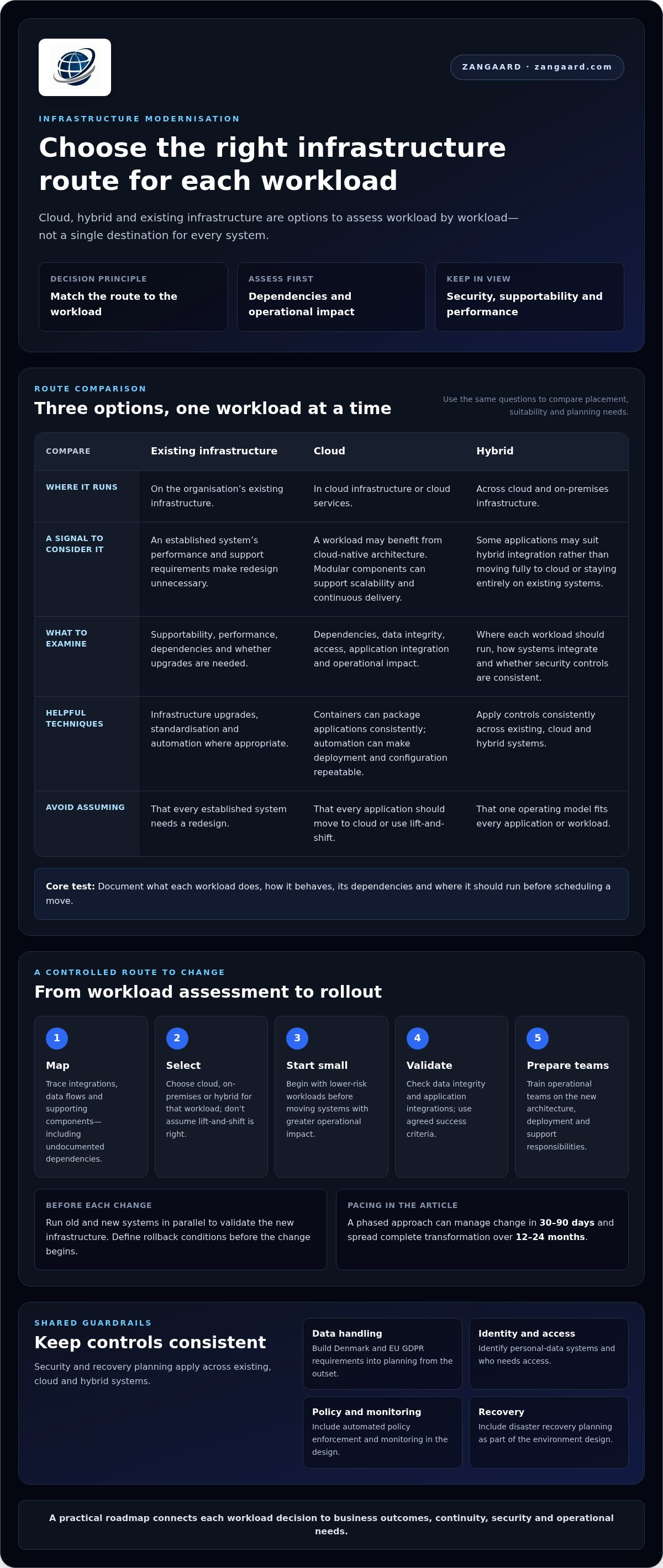
For Denmark and the EU, build GDPR data-handling requirements into modernisation planning from the outset. Identify which systems process personal data, who needs access and how information is protected across the environment. Include identity and access management, automated policy enforcement, monitoring and disaster recovery planning in the design. Check that security controls apply consistently across existing, cloud and hybrid systems.
-
Plan migration, validation and rollback
Move workloads in phases, starting with lower-risk systems before critical services. For each migration, document dependencies, data integrity checks and success criteria; run old and new systems in parallel to validate the new infrastructure. Prepare a rollback plan before the change begins, including the conditions for restoring the previous system. A phased approach can manage change in 30-90 days and spread complete transformation over 12-24 months.
-
Run pilot deployments and phased rollouts
Choose a pilot that tests a defined workload, migration process and operational support model before wider deployment. Compare performance, access, recovery and maintenance requirements with agreed criteria, then address issues the pilot reveals. Use the findings to refine the rollout sequence and upgrade plan. Expand in controlled phases rather than moving every system at once, and validate the results at each stage.
Cloud migration and hybrid infrastructure options
Choose cloud, hybrid or existing infrastructure on a workload-by-workload basis, rather than defaulting to a full cloud migration. Virtualisation, containers and automation can all support modernisation, alongside cloud services and infrastructure upgrades.
-
Assess legacy dependencies and data migration
Map each legacy application’s integrations, data flows and supporting components before choosing a migration route. Trace undocumented dependencies across teams and processes, as moving one component can disrupt another. Plan data transfer around integrity, access and application integration. Don’t schedule a workload until its dependencies and operational impact are understood.
-
Plan cloud-native architecture
Decide which workloads would benefit from cloud-native architecture rather than assuming every application needs redesign. Modular components can support scalability and continuous delivery, while containers can help package applications consistently. Use automation for repeatable deployment and configuration tasks. Retain established systems when their performance and support requirements make redesign unnecessary.
-
Migrate cloud infrastructure and workloads
Document what each workload does, how it behaves and where it should run: in the cloud, on-premises or in a hybrid arrangement. Select a migration strategy for each workload; lift-and-shift is not right for every application. Start with lower-risk workloads, validate data and application integrations, then move on to systems with greater operational impact.
-
Address migration risks and training
Assign owners to migration risks such as service interruption, compatibility issues and data integrity. Before workloads move, give operational teams practical training on the new architecture, deployment processes and support responsibilities. Use pilot feedback to clarify procedures and identify skills gaps. Technical transfer is not complete until teams can operate and maintain the migrated components.
Definition and strategic purpose of infrastructure modernisation
Modernisation is a business-led infrastructure change, not simply a technology refresh. Use these steps to connect each investment with operational needs and organisational direction.
- Define the business outcome before choosing technology. For example, if a sales application slows during peak demand, establish whether the constraint lies in network capacity, application design or supporting infrastructure. Similarly, organisations modernising operational workflows might introduce purpose-built software like GoBuid to streamline site documentation and reporting, rather than simply shifting unstructured files to cloud storage. This helps prevent an upgrade from becoming an isolated initiative without a clear purpose.
- Map the current state across applications, workloads, networks, servers, security, monitoring and recovery. Compare that inventory with the enterprise architecture to identify ageing equipment, weak redundancy, inconsistent standards and lifecycle gaps. These findings reveal which infrastructure components limit reliability or future scalability.
- Align business and technology leaders on priorities. Rank proposed work by continuity, uptime, security, scalability, deployment needs and operational impact. An IT infrastructure modernisation roadmap should explain why each initiative matters, which capabilities it enables and how it supports business strategy.
- Choose an operating model for each workload rather than imposing one answer across the organisation. Some applications may remain on existing infrastructure; others may suit cloud or hybrid integration. Compare supportability, performance and dependencies to select the model that fits each workload’s role.
- Set measures that show whether the change achieves its purpose. Track service reliability, security coverage, recovery readiness and the operational effort needed to maintain systems. Review each phase against those measures, adjust priorities and identify where standardisation can reduce complexity or improve efficiency.
ZANGAARD: Managed IT Operations
ZANGAARD supports organisations that need disciplined oversight to take modernisation from planning into day-to-day operations. Its Managed IT Operations and IT Infrastructure Management help coordinate infrastructure changes, maintain operational control and manage the environment as workloads evolve.
When migration creates new support demands, a Scalable Service Desk provides a structured way to handle user issues. Outsourcing Services can add operational capacity when internal teams need support managing infrastructure processes. These services are relevant when responsibilities span legacy systems, cloud platforms and hybrid environments, and consistent ownership is essential.
Explore ZANGAARD’s IT services or visit zangaard.com to discuss your infrastructure modernisation needs.
Make modernisation an ongoing capability
Make your IT infrastructure modernisation roadmap a working management discipline, not a document that gathers dust. Assign ownership for reviewing priorities as business needs change, and include operational performance in those discussions. This keeps future decisions aligned with the organisation’s direction.
ZANGAARD’s Managed IT Operations and IT Infrastructure Management support oversight of evolving environments, while its Scalable Service Desk helps manage user support as operational needs shift. The next step is a focused conversation about where your strategy needs stronger coordination or delivery capacity.
With clear ownership and regular review, modernisation can become a more deliberate part of how your organisation grows.
Frequently Asked Questions
What should a good modernisation roadmap achieve?
A good roadmap links infrastructure changes to defined business outcomes, such as keeping a customer-facing service available during peak demand. It clarifies who owns each initiative, how success will be measured and which decisions need leadership approval. This gives teams a basis for resolving competing priorities and makes progress visible beyond technical milestones.
What’s the lifespan of these technologies and software choices?
Infrastructure technologies and software don’t have a single fixed lifespan. Review each choice against supplier support, security maintenance, compatibility with connected systems and the organisation’s changing needs. For example, a platform may still run reliably but become unsuitable if it no longer receives security updates or prevents integration with a business-critical application. Use these signals to plan replacement before supportability becomes a problem.
What is an IT infrastructure modernisation roadmap?
An IT infrastructure modernisation roadmap is a decision framework linking infrastructure initiatives with business goals, accountable owners and measures of progress. It helps leaders compare proposals, such as replacing an unsupported platform or improving service monitoring, and make trade-offs visible. Treat it as a living management document, updating decisions when business priorities or operational constraints change.
What are the key phases and steps in an IT infrastructure modernisation roadmap?
Organise the work into decision gates: agree the intended outcome, assign an accountable owner, approve the proposed design, schedule implementation and review the results. At each gate, record dependencies, user impacts and unresolved decisions. For example, a change affecting finance and customer support should account for both teams’ readiness, not just technical completion. This governance makes handovers and approvals easier to manage.
How do you assess current IT infrastructure and prioritise modernisation initiatives?
Assess infrastructure using system records and operational evidence, including support incidents, recurring performance complaints, maintenance issues and business service dependencies. Then rank initiatives by the consequences of failure, security exposure, supportability and the number of services affected. A rarely used system with no viable support path may warrant attention before a visible, low-impact upgrade. Record the reason for each priority.

Disclaimer
The purpose of this article is to generate inspiration, reflection and to start a debate across markets, industries and organizations. We do not recommend any actions soly based on the article statements, claims or opinions, but recommend you to reach out directly to ZANGAARD for a qualified review, dialogue and/or consultation. Reach out at [email protected] or visit our website www.zangaard.com


