

A service desk can close tickets quickly and still leave users waiting for a lasting fix. Key performance indicators for IT support measure how well the service meets operational and user needs. A focused set of five to seven measures can show where response, resolution quality, workload and user experience need attention.
It is understandable to start with ticket counts or speed: they are visible and easy to track. But no single measure explains whether support is improving or simply moving work through the queue. Cost per resolution, for example, is more useful when considered alongside resolution outcomes and service quality.
This article explains how IT KPIs work, how to assess cost per resolution and why support measures matter. It also shows how to use benchmarks as a starting point, establish a baseline and review results over time, so performance data can guide practical, continual improvement.
Key Takeaways
- Assess cost per resolution alongside service quality, so efficiency gains don’t come at the expense of effective support.
- Use customer effort feedback to identify where users face friction and where support processes can be made clearer.
- Benchmark performance against a baseline, then review results regularly to see whether changes are delivering improvement.
- Connect support measures to operational priorities and use them to guide practical decisions about service delivery.
1. Cost per resolution
Cost per resolution estimates the support cost for each successfully resolved ticket. Divide relevant service desk costs by the number of resolved tickets over the same period. This differs from cost per ticket, which counts tickets handled, including unresolved cases. For a meaningful comparison, define which costs are included and what qualifies as resolved.
Total cost of ownership gives a broader view. Include the resources needed to run support, such as agent time, software, infrastructure and management. Account for repeat work too: a low first-contact cost may conceal further effort if the issue returns. Track first-level resolution alongside cost to assess both efficiency and outcomes.
Operational efficiency needs more than a cost figure. First response time measures the interval between ticket submission and the team’s reply. Mean time to resolution measures the average time agents take to resolve issues. Average handle time includes call talk time and time on hold. An agent spending 120 minutes across six tickets has an average handle time of 20 minutes per ticket. Balance speed with resolution quality.
Track ticket volume and resolution rate across a defined period. Resolution rate compares tickets resolved with tickets received during that period. Backlog shows the tickets waiting to be addressed. For example, 50 open tickets plus 40 new tickets, minus 60 resolved, leaves 30 tickets. Regularly tracking these measures in service desk software helps identify workload pressure and productivity patterns.
Statistics Denmark’s proposed performance indicators cover resource use, response burden, quality and user satisfaction. Consider cost per resolution alongside these dimensions, rather than treating it as a standalone target. This gives managers a clearer basis for deciding whether a process change improves service or simply reduces recorded effort.
2. Why are customer support KPIs important?
Customer support KPIs show whether a service solves users’ problems, not merely closes tickets. For Danish and EU teams, build privacy safeguards into measurement: limit identifiable ticket and employee data to a clear operational purpose, restrict access and favour aggregated reporting. This helps distinguish service patterns from individual monitoring.
Which KPIs balance speed, quality, cost and user satisfaction? A useful set of key performance indicators for IT support combines first-contact resolution and resolution time with satisfaction, customer effort, cost per resolution and backlog. Monitor them together against organisational goals. Faster closure matters only when the issue is fixed and users can get back to work.
Three customer metrics add the user’s perspective. Customer Satisfaction Score (CSAT) measures how satisfied users are with support. For example, 100 responses totalling 400 points out of a possible 500 produce an 80% score. Customer Effort Score (CES) measures how difficult resolving an issue felt; a survey can ask users to rate effort from 1 to 10. Net Promoter Score (NPS) asks whether users would recommend the support service, using a 0-to-10 scale. Scores of 9-10 are promoters, 7-8 are passives, and 0-6 are detractors.
What risks come from choosing the wrong KPIs or rewarding speed alone? Agents may prioritise quick closures over complete fixes, increasing repeat contacts and weakening user satisfaction. Pair response measures with resolution quality and feedback, then review the results for patterns. A rising escalation rate, for example, may signal a need for better guidance or resources, rather than faster ticket handling.
3. Benchmarking and continuous improvement
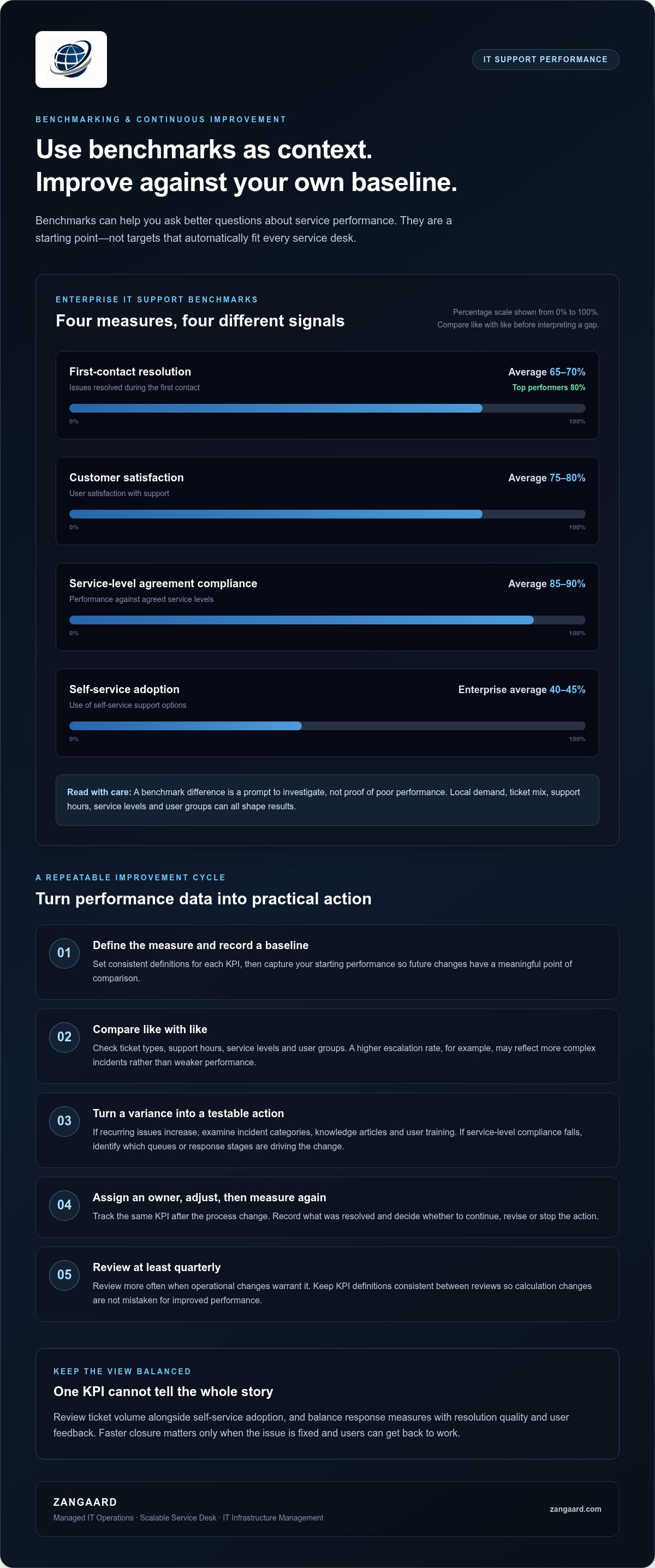
Benchmarks provide context, but they aren’t targets that fit every service desk. Enterprise IT support figures place average first-contact resolution at 65-70%, whilst top performers reach 80%. Average customer satisfaction is 75-80%, and average service-level agreement compliance is 85-90%. Use these comparisons to identify questions, not to assume a gap means poor performance.
Start by defining each measure and recording a baseline. Compare like with like: ticket types, support hours, service levels and user groups can all affect results. For example, a higher escalation rate may reflect complex incidents rather than weak performance. Review ticket volume and self-service adoption together; the enterprise average for self-service adoption is 40-45%, but local demand and available guidance shape what that means for your operations.
Turn each variance into a testable action. If recurring issues increase, examine incident categories, knowledge articles and user training. If service-level compliance falls, identify which queues or response stages are driving the change. Assign an owner, adjust the process, then measure the same KPI again. This links measurement to operational efficiency and makes success visible in results, not assumptions.
Review KPIs at least quarterly, and more often when operational changes warrant it. Keep definitions consistent from one review to the next, so a change in calculation does not appear to be improved performance. Compare results with the baseline, record what was resolved and decide whether to continue, revise or stop each action. This disciplined cycle turns response data and user interactions into evidence for improving service processes.
ZANGAARD: Managed IT Operations
ZANGAARD helps organisations turn support measurements into a structured view of daily service performance. Its Managed IT Operations brings operational oversight and KPI tracking into one management approach, helping teams connect service desk activity with wider infrastructure needs.
Consider this support when your organisation has useful metrics but struggles to translate them into clear priorities, or when ticket volumes and service processes are becoming harder to coordinate. A Scalable Service Desk can support changing demand, while IT Infrastructure Management addresses the systems underpinning support. Explore ZANGAARD’s IT services to see how these capabilities relate to your operational requirements.
To discuss how ZANGAARD can support your IT operations, contact the team.
Make performance data the start of better decisions
The next step is to turn measurement into ownership: decide who reviews each indicator, what action follows a change and how teams record whether that action helped. A consistent approach to key performance indicators for IT support makes service performance easier to govern and improvement more deliberate.
ZANGAARD’s Managed IT Operations, IT Infrastructure Management and Scalable Service Desk support organisations seeking joined-up oversight of support and the systems behind it. This can be useful when responsibility is spread across teams or service activity is difficult to align with operational priorities.
Start with a practical measure, assign a clear owner and build from there. Each review can strengthen accountability across the service.
Frequently Asked Questions
What are IT KPIs?
IT KPIs are selected measures used to judge whether technology services support organisational objectives. A business prioritising employee productivity might track service availability and recurring incidents, whilst one seeking predictable support could monitor SLA compliance. A measure is useful when leaders define its purpose, assign responsibility for reviewing it and connect the result to a decision.
What are the KPI metrics for support service?
Useful support service metrics include SLA compliance, escalation rate, ticket deflection, knowledge-base use and critical-system availability. Choose measures that reveal different aspects of delivery rather than several versions of the same result. For example, pairing escalation data with knowledge-base use can help managers assess whether guidance enables teams to handle recurring requests effectively.
What is the difference between KPIs and help desk metrics?
KPIs indicate progress towards an important service or business objective; help desk metrics record operational activity. For instance, the number of incidents by category is a metric that reveals demand patterns. If reducing recurring disruptions is a priority, an organisation could use the trend in repeat incidents as a KPI, with a defined owner and improvement action.
How do you measure the success of a service desk?
Measure success by checking whether the service desk meets its agreed service objectives and enables users to work. Combine operational evidence, such as SLA performance and repeat incidents, with user feedback and business context. If a change reduces repeat problems but creates more escalations, review both outcomes before deciding whether to make it standard practice.
How do you monitor service desk performance?
Use a consistent reporting view that brings together ticket records, service-level results and user feedback. Check that categories and status fields are applied consistently, then segment results by issue type or support channel to reveal where performance differs. Assign an owner to investigate significant changes and record the action taken, so each review informs the next operational decision.

Disclaimer
The purpose of this article is to generate inspiration, reflection and to start a debate across markets, industries and organizations. We do not recommend any actions soly based on the article statements, claims or opinions, but recommend you to reach out directly to ZANGAARD for a qualified review, dialogue and/or consultation. Reach out at [email protected] or visit our website www.zangaard.com


